
Oral Presentation Guidelines
You are strictly requested to prepare your presentation following the environment listed below:
- A PC projector is prepared in the room for your presentation.
(Note: Overhead projector is not prepared)
- No PC for presenters prepared in the room.
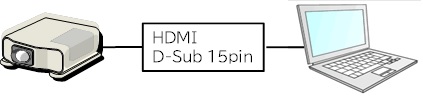
- If your PC does not have an HDMI or D-Sub terminal, it cannot be directly connected to the LCD projector at the venue. Presenters are requested to prepare their own conversion connectors.
D-sub to HDMI conversion connectors are used in Room 1 to 4. If further conversion connectors are used, there is a possibility that the screen will not project properly. For those who use a PC without an HDMI port, it is recommended to prepare a connector to convert the video output terminal to D-sub by yourself. - A PC projector system is prepared as follows:
- Please protect your own PC and PC data. ISIJ do not take any responsibility for broken, lost or stolen items.
- Please connect your PC to the plug of the projector cable just before your presentation. Also, before your presentation, you should ensure that your PC and projector work correctly during the break.
- Please choose XGA(1024×768) of the display size on your PC.